
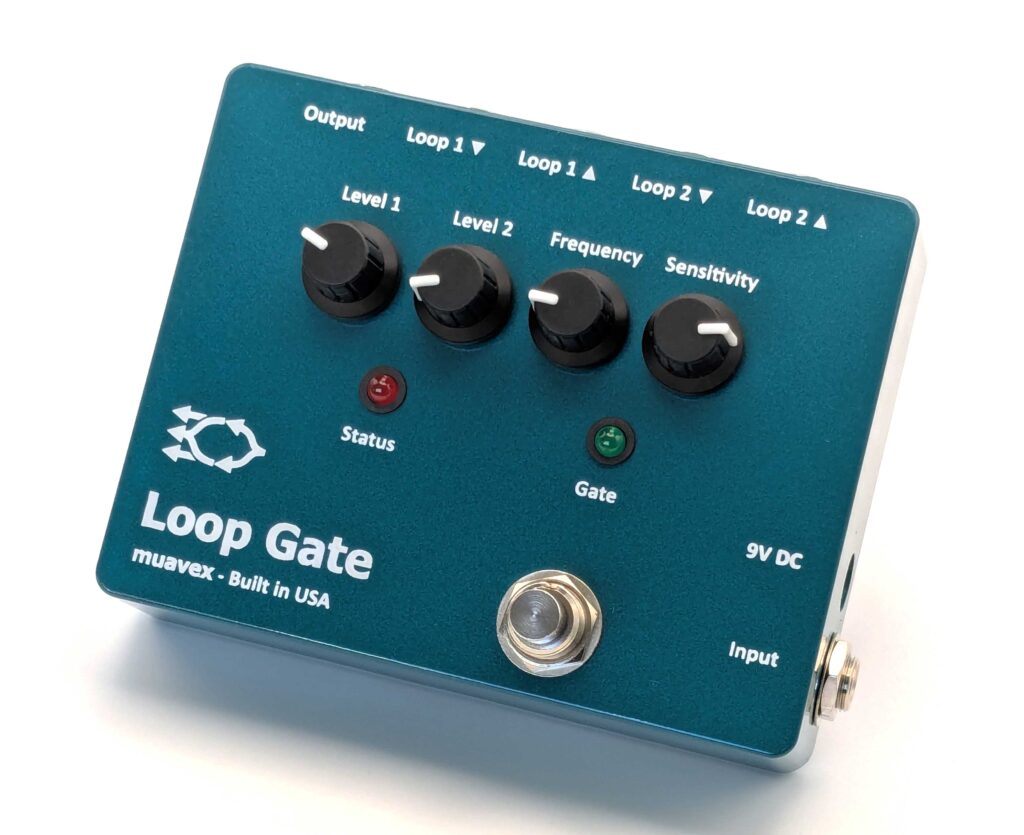

Loop Gate
An extremely versatile utility effect that responds to your playing
What is the Loop Gate?
It works like a noise gate, but instead of muting your guitar until you play, the Loop Gate switches between two effects loops based on how loud/hard you play. You control the input level that switches the effects loops with the frequency and sensitivity controls. These controls have been designed to give you the most musical control of the effect.
The Loop Gate can do much more than automatically switch between effects loops. You can use it as a/an –
- automatic switch (gate) between two effects loops depending on input volume
- footswitch selected single effects loop – can add true bypass to an effect that is not true bypass
- automatic switch (gate) between two levels of boost/cut depending on input volume
- footswitch selected boost/cut
- automatic switch (gate) between two signal paths (A/BY) depending on input volume – can automatically send your signal to one amplifier or a second depending on input volume
- footswitch selected signal path (A/BY)
- noise gate (with Level 1 set to lowest setting and Frequency set to highest setting)
- signal buffer
- phase inverting signal buffer
In production – available soon
Contact us if you would like to be notified when the Loop Gate is in stock.
Design details:
- Enclosure size is 4.7″ W x 3.7″ L x 1.34″ H (119 x 94 x 34 mm).
- Enclosure is professionally powder coated.
- True bypass switching if desired can be enabled with an internal micro-switch.
- Can be powered by a 9V battery or a 9V DC, center-negative (−) power supply with a 5.5mm x 2.1mm barrel connector. Bottom cover can be removed to install a 9V battery.
- Each effects loop is connected send-to-return if nothing is connected to the effects loop send.
- The send level of each effects loop can be boosted with the level control by up to approximately 20 dB.
- Effects loop tails are preserved when the Loop Gate switches from one effects loop to the other. (For example, echos from a delay connected to one effects loop will still be heard when the Loop Gate switches to the other effects loop.)
How does it work?
The sensitivity control sets the level of input that switches from one effects loop to the second one. When triggered, the sensitivity is automatically increased so that the switch from one loop to the other is maintained until the level of input is quite low. The effect is best reset by muting your guitar strings, but notes that are held will eventually lower in volume enough to reset the effect.
A second-order low-pass filter is included in control of the gate function so that lower notes can trigger the effect more easily than higher notes. The frequency control is used to set the filter frequency. This feature is useful for having chords and rhythm trigger the effect more easily than single-note lines and double stops played higher up the neck of your guitar. When playing, you can have one loop/level for rhythm and a second loop/level for lead notes.
While the gate function works great, it can work even better when the volume knob of your guitar is used in conjunction with the effect. A little adjustment of your guitar volume can limit the triggering of the effect when turned down some and then hold the triggering of the effect when turned back up. The level control of Loop 1 can be used to compensate for the guitar volume knob being turned down some when Loop 1 is active.
As technical as this may all sound, the effect is intuitive and fun and that’s the main point. It has so many uses. We enjoy it and hope you will find it as fun and useful as we do.
Why are the inputs and outputs arranged in an L-format?
The input and DC power jacks are on the right side of the effect because this effect is intended to be the first on your board, with your guitar plugged into this effect first. Then the jacks for the loops and effect output are rear mounted to help route cables on your board. We know this is a larger effect but the size of the effect is mostly the result of our choice of using only high-quality, through-hole components.
Enhance Your Creativity with the Loop Gate Pedal
Explore the Loop Gate’s features and learn how to enhance your guitar sound with control of two effects loops.

Step One: Connect Your Gear
Connect your guitar, other effects, and amplifier to the Loop Gate pedal, setting the stage for dynamic sound control.

Step Two: Customize Your Settings
Adjust the levels, frequency, and sensitivity to tailor control of the effect, unlocking unique musical possibilities.

Step Three: Perform and Record
Use the pedal’s versatile response to your playing, enriching your performances and recordings.